Showing posts with label apex. Show all posts

Tuesday, 30 May 2023

Send email using guest user by apex code

Sending Email from Guest User Profile- Email No Receiving Email 


Send email using guest user


public pageReference generatePDF() {    

        if(caseId != '') {

            Case cs = [select Id,CaseNumber,Quote_Number__c from Case where Id=:caseId LIMIT 1];      

            pageReference pdfPage = Page.EnceliumForm;

            blob pdfBody;

            if(Test.isRunningTest()) { 

              pdfBody = blob.valueOf('Unit.Test');

            } else {

                pdfBody = pdfPage.getContentAsPdf(); 

            }       

            system.debug('in method--------->>'+caseId+cs);

            system.debug('pdfFile===>'+pdfBody);

            attachment pdfFile = new attachment();

            pdfFile.isPrivate  = false;

            pdfFile.body       = pdfBody;

            pdfFile.parentId   = cs.Id; // '5003B000005oRIx';

            pdfFile.Name       = 'Encelium Request form.pdf';        

            insert pdfFile; 

            system.debug('## pdfFile===>'+pdfFile);

            if(string.isNotBlank(ecContactEmail)) {

                system.debug('## ecContactEmail===>'+ecContactEmail);                

                OrgWideEmailAddress owea = new OrgWideEmailAddress();

                owea = [SELECT Id, Address, DisplayName FROM 

                        OrgWideEmailAddress WHERE displayname='Legrand CRM Support Team' limit 1];                                                

                string conEmail = ecContactEmail;

                Messaging.EmailFileAttachment att = new Messaging.EmailFileAttachment();

                att.setBody(pdfBody);

                att.setContentType('application/pdf');

                att.setFileName('attachment.pdf');

                Messaging.SingleEmailMessage mess = new Messaging.SingleEmailMessage();

                mess.setSubject('Encelium Request Form:'+' Your Case Number: '+ cs.CaseNumber);

                mess.setToAddresses(new String[]{conEmail}); 


                mess.setHtmlBody('Please find attached self-signed Encelium Request Form. <br/><br/> Please do not reply to this mail');

                mess.setFileAttachments(new Messaging.EmailFileAttachment[]{att});

                mess.setSaveAsActivity(false);

                mess.setOrgWideEmailAddressId(owea.id);

              //Messaging.sendEmail(new Messaging.Email[]{mess});

                system.debug('## End===>');


                try{

                    List<Messaging.SendEmailResult> results =   Messaging.sendEmail(new Messaging.Email[]{mess});

                    if(results[0].success){

                         system.debug('## success===>');

                    }else{

                        system.debug('## Fail===>');

                    }

                } catch(Exception ex){

                    system.debug('## Exception===>'+ex.getMessage() +' LN ='+ex.getLineNumber());

                }


            }

        }

        return new pagereference('http://www.Legrand.us').setRedirect(true);

    }

Wednesday, 22 February 2023

How to detect browser in lightning component


How to detect browser in lightning component


This example shows usage of the $Browser global value provider.

In Lightning component 

<aura:component> {!$Browser.isTablet} {!$Browser.isPhone} {!$Browser.isAndroid} {!$Browser.formFactor} </aura: component>

In a client-side controller

({ checkBrowser: function(component) { var device = $A.get("$Browser.formFactor"); alert("You are using a " + device); } })


Thursday, 19 January 2023

Get URL parameters in Lightning Components

 You can get lightning parameter in two way : 

1)  

lightning:isUrlAddressable Interface : Get URL parameters in Lightning Components


We can fetch URL param by using "{!v.PageReference.state.parameterName}" where parameterName is URL parameter name.


<aura:component  implements="lightning:isUrlAddressable,force:appHostable" access="global">
    <aura:attribute name="urlParam" type="string"/>
    <div class="slds-card">
    If you implements "lightning:isUrlAddressable" interface, then by 
        using v.pageReference,you can get URL params.
    <div class="slds-box">  
        Account Name is :  <b>{!v.pageReference.state.accname}</b>
        </div>
    </div> 
</aura:component>

"/lightning/n/tabName?accname=Naresh Thakur"

Output is : 
Account Name is : Naresh Thakur


2) You can write code in js component 
For Ex 

doInit : function(component, event, helper) {       
         var sPageURL = decodeURIComponent(window.location.search.substring(1));
         var sURLVariables = sPageURL.split('&');
         var sParameterName;
         for (var i = 0; i < sURLVariables.length; i++) {
             sParameterName = sURLVariables[i].split('=');             
             if (sParameterName[0] === 'conId') {
                 component.set('v.tempConId',sParameterName[1]);
             }
         }
         
        // Other code goes here
    },

Call it 
https://YourURL/Pagename?conId = aio000000000ADSuiq

Tuesday, 28 June 2016

Difference between Lookup Relationship and Master-Detail RelationShip in salesforce.

Lookup Relationship Master Detail Relation ship
Loosely coupled Tightly coupled
Max number of lookup is 25 Max number of master is 2
Parent is not a mandatory field Parent is a mandatory field
Partent delete child cannot delete parent delete child also delete
Roll up cannot be made on lookup Roll up can be made on master-detail
You can have a detail record without a lookup reference You cannot have a detail record without a master
You can set profile object permissions for a child record You cannot set profile object permissions for a child record


Friday, 10 June 2016

Apex trigger in salesforce

Trigger is piece of code that is executes before and after a record is Inserted / Updated / Deleted from the force.com database.
A trigger is Apex code that executes before or after the following types of actions:
  • Insert
  • Update
  • Delete
  • Merge
  • Upsert
  • Undelete

There are two types of triggers:
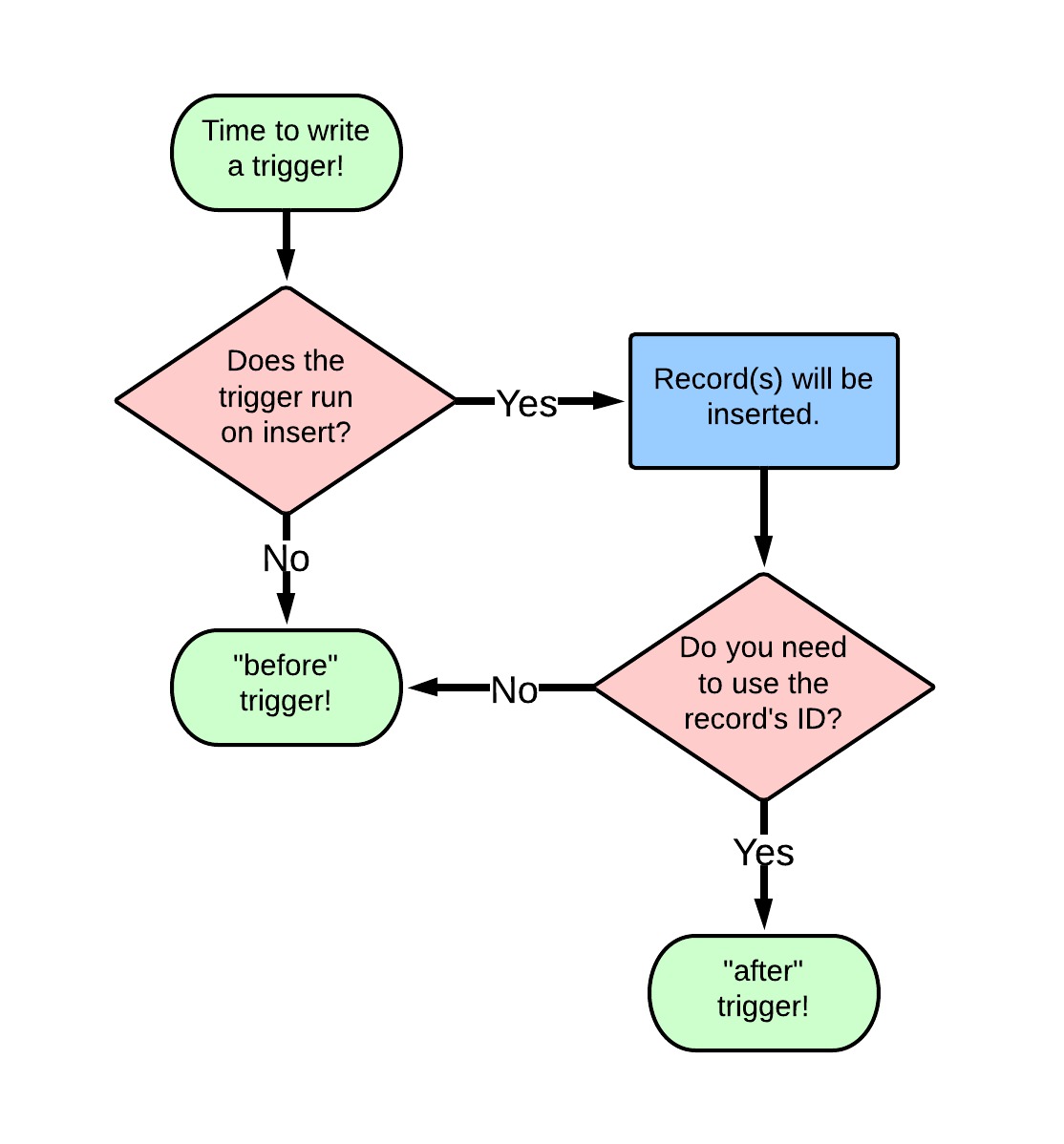
  1.     Before triggers: used to update / validate record's before they are saved to the objects.
  2.     After triggers: used to access fields values that are set by the system (i.e. a record's Id), and to affect changes in other record's, such as logging into an audit table or firing asynchronous events with a queue. The record's that fire the after trigger are read-only.
Additionally, if you update or delete a record in its before trigger, or delete a record in its after trigger, you will receive a runtime error. This includes both direct and indirect operations. For example, if you update account A, and the before update trigger of account A inserts contact B, and the after insert trigger of contact B queries for account A and updates it using the DML update statement or database method, then you are indirectly updating account A in its before trigger, and you will receive a runtime error.

Before creating triggers, consider the following:

  1.     upsert triggers fire both before and after insert or before and after update triggers as appropriate.
  2.     merge triggers fire both before and after delete triggers for the losing records and before update triggers for the winning record only. See Triggers and Merge Statements.
  3.     Triggers that execute after a record has been undeleted only work with specific objects. See Triggers and Recovered Records.
  4.     Field history is not recorded until the end of a trigger. If you query field history in a trigger, you don’t see any history for the current transaction.
  5.     Field history tracking honors the permissions of the current user. If the current user doesn't have permission to directly edit an object or field, but they activate a trigger that changes an object or field with history tracking enabled, no history of the change is recorded.
  6.     In API version 20.0 and earlier, if a Bulk API request causes a trigger to fire, each chunk of 200 records for the trigger to process is split into chunks of 100 records. In Salesforce API version 21.0 and later, no further splits of API chunks occur. If a Bulk API request causes a trigger to fire multiple times for chunks of 200 records, governor limits are reset between these trigger invocations for the same HTTP request.
Bulk Triggers:
By default every apex trigger is a bulk trigger which is used to process the multiple records at same time as a batch. For each batch of 200 records.

When to use Triggers:
Let me give you the definitive answer to perhaps the most commonly asked Apex question:
“Should I use a before or after trigger?”
Trigger Context Variables:

All triggers define implicit variables that allow developers to access run-time context. These variables are contained in the System.Trigger class.

All the trigger context variables are prefixed with “Trigger.” (Ex: Trigger.isInsert, etc..)
isInsert: Returns true if the trigger was fired due to insert operation.
isUpdate: Returns true if the trigger was fired due to update operation.
isDelete: Returns true if the trigger was fired due to delete operation.
isBefore: Returns true if the trigger was fired before record is saved.
isAfter: Returns true if the trigger was fired after record is saved.
New: Returns a list of new version of sObject records.
Old: Returns a list of old version of sObject records.
NewMap: Returns a map of new version of sObject records. (map is stored in the form of map<id,newRecords>)
OldMap: Returns a map of old version of sObject records. (map is stored in the form of map<id,oldRecords>)
Size: Returns a integer (total number of records invoked due to trigger invocation for the both old and new)
isExecuting: Returns true if the current apex code is a trigger.

The below table is tells what are the events we can use in the new trigger and old trigger

 
Trigger Event Trigger.New Trigger.Old
Before Insert Yes No
Before Update Yes Yes
Before Delete No Yes
Before UnDelete No Yes
After Insert Yes No
After Update Yes Yes
After Delete No Yes

Trigger Context Variable considerations:
  • Trigger.Old is always readOnly
  • We cannot delete trigger.new
  • In before triggers, trigger.new can be used to update the fields on the same object.
  • In After trigger, we get run time exception is thrown when user try to modify the fields in the same object.

Tags:
        Apex trigger, soql trigger, salesforce trigger


Tuesday, 7 June 2016

Difference between trigger and workflow

Workflow Trigger
Workflow is automated process that fired an action based on Evaluation criteria and rule criteria. Trigger is a piece of code that executes before or after a record is inserted or updated.
We can access a workflow across the object. We can access the trigger across the object and related to that objects
We cannot perform DML operation on workflow We can use 20 DML operations in one trigger.
We cannot query from database We can use 20 SOQL’s from data base in one trigger.
workflows will only helpful to update the same object or master object in custom master-detail relationships. Trigger can work across objects and also you can query or DMLs operation.
Workflow is inbuilt functionality and used on single objects or master-detail Trigger is used for complex business process where multiple Object's need to be handle.
Workflow can work only after some action. Trigger can be used before and after some action.


What are the main things need to consider in the “Master-Detail Relationship”?

 Point to remembeir when creating “Master-Detail Relationship”
 Parent child relationship is tightly coupled relationship having some below attributes
  • Parent reference become mandatory for child object.
  • Standard objects can't become child of any object.
  • Master details support Cascaded delete: if you delete the parent, it can cascade delete the child.
  • Sharing rules on child object's determind by parent.
  • You can have only 2 master details relationship on an object in salesforce.


Self Relationship

Self Relationship is a lookup relationship to the same object. Suppose let’s take an object “Merchandise”. Here we can create relationship in between the Account to Account (same object) object. That is called “Self Relationship”.

List examples of custom field types?

Text, Pick list, Pick list (multi select), Date, Email, Date/Time, Date, Currency, Checkbox, Number, Percent, Phone, URL, Text Area, Geolocation, lookup relationship, master detail relationship etc…..

A custom object contains some records, now my requirement is to create field in this object with master detail relationship. Can we create master detail relationship in this case?

No, directly we cannot create master details relationship if custom object contains existing records.
   Following are the steps to create to create master-detail relationship when records are available in custom object.
  1. First create field with lookup relationship.
  2. And then associate look field with parent record for every record
  3. Next change the data type of the field from look up to Master detail.

create Many – to – Many relationship?

Lookup and Master detail relationships are one to many relationships. We can create many – to – Many relationship by using junction object. Junction object is a custom object with two master detail relationships.

Saturday, 4 June 2016

What is TAB in Salesforce?

Tab is a user interface component to user creates to display custom object data.
There are three type of tabs.
 1) Custom object tabs
    Custom object tabs are the user interface for custom applications that you build in salesforce.com.
    They look and behave like standard salesforce.com tabs such as accounts, contacts, and opportunities

2) Visualforce Tabs
    Visualforce Tabs are custom tabs that display a Visualforce page. Visualforce tabs look and behave like standard salesforce.com tabs such as accounts, contacts, and opportunities.

3) Web Tabs
    Web Tabs are custom tabs that display web content or applications embedded in the salesforce.com window. Web tabs make it easier for your users to quickly access content and applications they frequently use without leaving the salesforce.com application.

4) Lightning Component Tabs
    Lightning Component tabs allow you to add Lightning Components to the navigation menu in Salesforce1.

5) Lightning Page Tabs
    Lightning Page Tabs let you add Lightning Pages to the Salesforce1 navigation menu.
Lightning Page tabs don't work like other custom tabs. Once created, they don't show up on the All Tabs page when you click the Plus icon that appears to the right of your current tabs. Lightning Page tabs also don't show up in the Available Tabs list when you customize the tabs for your apps.
You can't access the Lightning Component tab outside of Salesforce1. For example, you can't access the Lightning Component tab from the full Salesforce site.
Note:- To create Tab, User Permissions Needed

Define a  Custom object tabs to display data stored in your custom object records.

1) From Setup, enter Tabs in the Quick Find box, then select Tabs or Setup - Build - Create and     click   on Tabs.
2) Click New in the Custom Object Tabs related list.
3) Select the custom object to display in the custom tab. The label of the new tab is the same as the plural version of the custom object label.


4) Click the Tab Style lookup icon to display the Tab Style Selector.
5) Click a tab style to select the color scheme and icon for the custom tab.
6) Optionally, choose a custom link to use as the introductory splash page when users initially click the tab.
7) Enter a description of the tab, if desired, and click Next.
8) Choose the user profiles for which the new custom tab will be available.

9) Specify the custom apps that should include the new tab.

10) Select "Append tab to users' existing personal customizations" checkbox to add the tab to your users’ customized display settings if they have customized their personal display.
11) Click Save.

What is Cloud Computing?

  • Pictorial representation of internet is Cloud.
  • Cloud Computing is nothing but internet computing.
  • With this approach everything can be done in internet, no need of any minimum hardware requirements and no need to install any software in local system.
  • Cloud Computing is an approach to provide the following services:-
    • SAAS (Software As A Service)
    • PAAS (Platform As A Service)
    • IAAS (Infrastructure As A Service)