| Apex Trigger | Apex Batch |
| Triggers run each time a DML operation is called against a record | Batch Apex runs across a (possibly large) set of data and performs some type of processing on it |
| A trigger is Apexcode that executes before or after some event (i.e. insert,update,delete,merge,upsert,undelete) | Batch Apex runs whenever it is specifically called (or scheduled to run). |
| trigger not queued for run, which cause immediat action. | Batch queued to run, which may cause delays in starting.There's a limit of 5 batches in play at any time. but when that queue is full (Max. limit 5 concurrent batches), the job fails instead of being rescheduled for later processing. |
Monday, 18 July 2016
Difference between trigger and batch in salesforce

Tuesday, 28 June 2016
Difference between Lookup Relationship and Master-Detail RelationShip in salesforce.
| Lookup Relationship | Master Detail Relation ship |
| Loosely coupled | Tightly coupled |
| Max number of lookup is 25 | Max number of master is 2 |
| Parent is not a mandatory field | Parent is a mandatory field |
| Partent delete child cannot delete | parent delete child also delete |
| Roll up cannot be made on lookup | Roll up can be made on master-detail |
| You can have a detail record without a lookup reference | You cannot have a detail record without a master |
| You can set profile object permissions for a child record | You cannot set profile object permissions for a child record |
Friday, 10 June 2016
Apex trigger in salesforce
Trigger is piece of code that is executes before and after a record is Inserted / Updated / Deleted from the force.com database.
A trigger is Apex code that executes before or after the following types of actions:
There are two types of triggers:
Before creating triggers, consider the following:
By default every apex trigger is a bulk trigger which is used to process the multiple records at same time as a batch. For each batch of 200 records.
When to use Triggers:
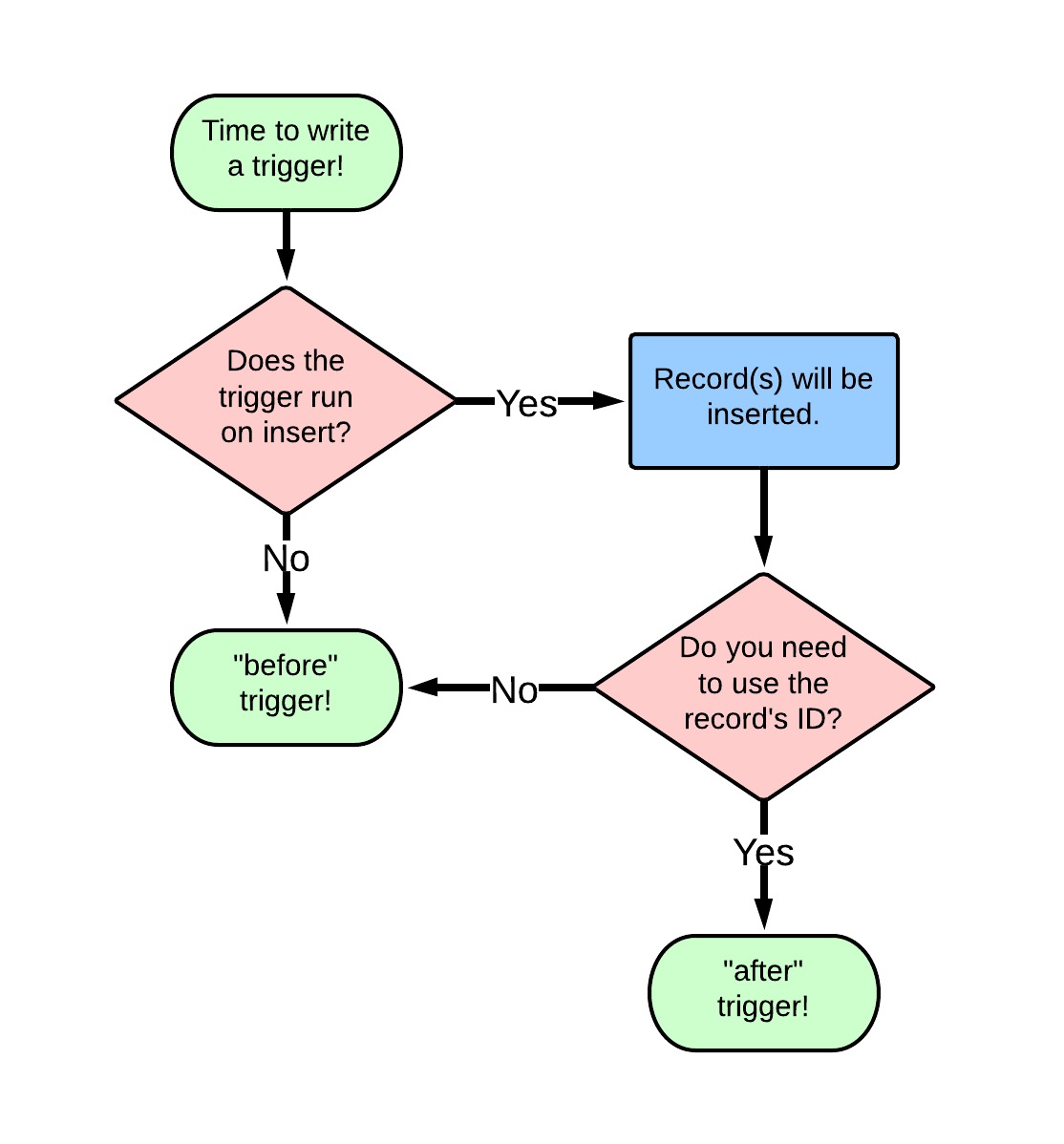
Let me give you the definitive answer to perhaps the most commonly asked Apex question:
“Should I use a before or after trigger?”
 Trigger Context Variables:
All triggers define implicit variables that allow developers to access run-time context. These variables are contained in the System.Trigger class.
All the trigger context variables are prefixed with “Trigger.” (Ex: Trigger.isInsert, etc..)
isInsert: Returns true if the trigger was fired due to insert operation.
isUpdate: Returns true if the trigger was fired due to update operation.
isDelete: Returns true if the trigger was fired due to delete operation.
isBefore: Returns true if the trigger was fired before record is saved.
isAfter: Returns true if the trigger was fired after record is saved.
New: Returns a list of new version of sObject records.
Old: Returns a list of old version of sObject records.
NewMap: Returns a map of new version of sObject records. (map is stored in the form of map<id,newRecords>)
OldMap: Returns a map of old version of sObject records. (map is stored in the form of map<id,oldRecords>)
Size: Returns a integer (total number of records invoked due to trigger invocation for the both old and new)
isExecuting: Returns true if the current apex code is a trigger.
The below table is tells what are the events we can use in the new trigger and old trigger
Trigger Context Variable considerations:
Tags:
Apex trigger, soql trigger, salesforce trigger
A trigger is Apex code that executes before or after the following types of actions:
- Insert
- Update
- Delete
- Merge
- Upsert
- Undelete
There are two types of triggers:
- Before triggers: used to update / validate record's before they are saved to the objects.
- After triggers: used to access fields values that are set by the system (i.e. a record's Id), and to affect changes in other record's, such as logging into an audit table or firing asynchronous events with a queue. The record's that fire the after trigger are read-only.
Before creating triggers, consider the following:
- upsert triggers fire both before and after insert or before and after update triggers as appropriate.
- merge triggers fire both before and after delete triggers for the losing records and before update triggers for the winning record only. See Triggers and Merge Statements.
- Triggers that execute after a record has been undeleted only work with specific objects. See Triggers and Recovered Records.
- Field history is not recorded until the end of a trigger. If you query field history in a trigger, you don’t see any history for the current transaction.
- Field history tracking honors the permissions of the current user. If the current user doesn't have permission to directly edit an object or field, but they activate a trigger that changes an object or field with history tracking enabled, no history of the change is recorded.
- In API version 20.0 and earlier, if a Bulk API request causes a trigger to fire, each chunk of 200 records for the trigger to process is split into chunks of 100 records. In Salesforce API version 21.0 and later, no further splits of API chunks occur. If a Bulk API request causes a trigger to fire multiple times for chunks of 200 records, governor limits are reset between these trigger invocations for the same HTTP request.
By default every apex trigger is a bulk trigger which is used to process the multiple records at same time as a batch. For each batch of 200 records.
When to use Triggers:
Let me give you the definitive answer to perhaps the most commonly asked Apex question:
“Should I use a before or after trigger?”
All triggers define implicit variables that allow developers to access run-time context. These variables are contained in the System.Trigger class.
All the trigger context variables are prefixed with “Trigger.” (Ex: Trigger.isInsert, etc..)
isInsert: Returns true if the trigger was fired due to insert operation.
isUpdate: Returns true if the trigger was fired due to update operation.
isDelete: Returns true if the trigger was fired due to delete operation.
isBefore: Returns true if the trigger was fired before record is saved.
isAfter: Returns true if the trigger was fired after record is saved.
New: Returns a list of new version of sObject records.
Old: Returns a list of old version of sObject records.
NewMap: Returns a map of new version of sObject records. (map is stored in the form of map<id,newRecords>)
OldMap: Returns a map of old version of sObject records. (map is stored in the form of map<id,oldRecords>)
Size: Returns a integer (total number of records invoked due to trigger invocation for the both old and new)
isExecuting: Returns true if the current apex code is a trigger.
The below table is tells what are the events we can use in the new trigger and old trigger
| Trigger Event | Trigger.New | Trigger.Old |
| Before Insert | Yes | No |
| Before Update | Yes | Yes |
| Before Delete | No | Yes |
| Before UnDelete | No | Yes |
| After Insert | Yes | No |
| After Update | Yes | Yes |
| After Delete | No | Yes |
Trigger Context Variable considerations:
- Trigger.Old is always readOnly
- We cannot delete trigger.new
- In before triggers, trigger.new can be used to update the fields on the same object.
- In After trigger, we get run time exception is thrown when user try to modify the fields in the same object.
Tags:
Apex trigger, soql trigger, salesforce trigger
Tuesday, 7 June 2016
Difference between trigger and workflow
| Workflow | Trigger |
| Workflow is automated process that fired an action based on Evaluation criteria and rule criteria. | Trigger is a piece of code that executes before or after a record is inserted or updated. |
| We can access a workflow across the object. | We can access the trigger across the object and related to that objects |
| We cannot perform DML operation on workflow | We can use 20 DML operations in one trigger. |
| We cannot query from database | We can use 20 SOQL’s from data base in one trigger. |
| workflows will only helpful to update the same object or master object in custom master-detail relationships. | Trigger can work across objects and also you can query or DMLs operation. |
| Workflow is inbuilt functionality and used on single objects or master-detail | Trigger is used for complex business process where multiple Object's need to be handle. |
| Workflow can work only after some action. | Trigger can be used before and after some action. |
What are the main things need to consider in the “Master-Detail Relationship”?
Point to remembeir when creating “Master-Detail Relationship”
Parent child relationship is tightly coupled relationship having some below attributes

Parent child relationship is tightly coupled relationship having some below attributes
- Parent reference become mandatory for child object.
- Standard objects can't become child of any object.
- Master details support Cascaded delete: if you delete the parent, it can cascade delete the child.
- Sharing rules on child object's determind by parent.
- You can have only 2 master details relationship on an object in salesforce.

Self Relationship
Self Relationship is a
lookup relationship to the same object. Suppose let’s take an object
“Merchandise”. Here we can create relationship in between the Account to
Account (same object) object. That is called “Self Relationship”.

List examples of custom field types?
Text, Pick list, Pick list
(multi select), Date, Email, Date/Time, Date, Currency, Checkbox,
Number, Percent, Phone, URL, Text Area, Geolocation, lookup
relationship, master detail relationship etc…..
Subscribe to:
Posts (Atom)